

Your fleet file, ready for the audit.
Driver qualification, hours of service, trip inspections, maintenance, fuel tax and roadside results in one place — scored against the standards an auditor actually opens. For federally regulated carriers and for the five-truck provincial operation with nobody in the office.
No credit card. No sales call. Fleet is included in every plan at no extra cost.
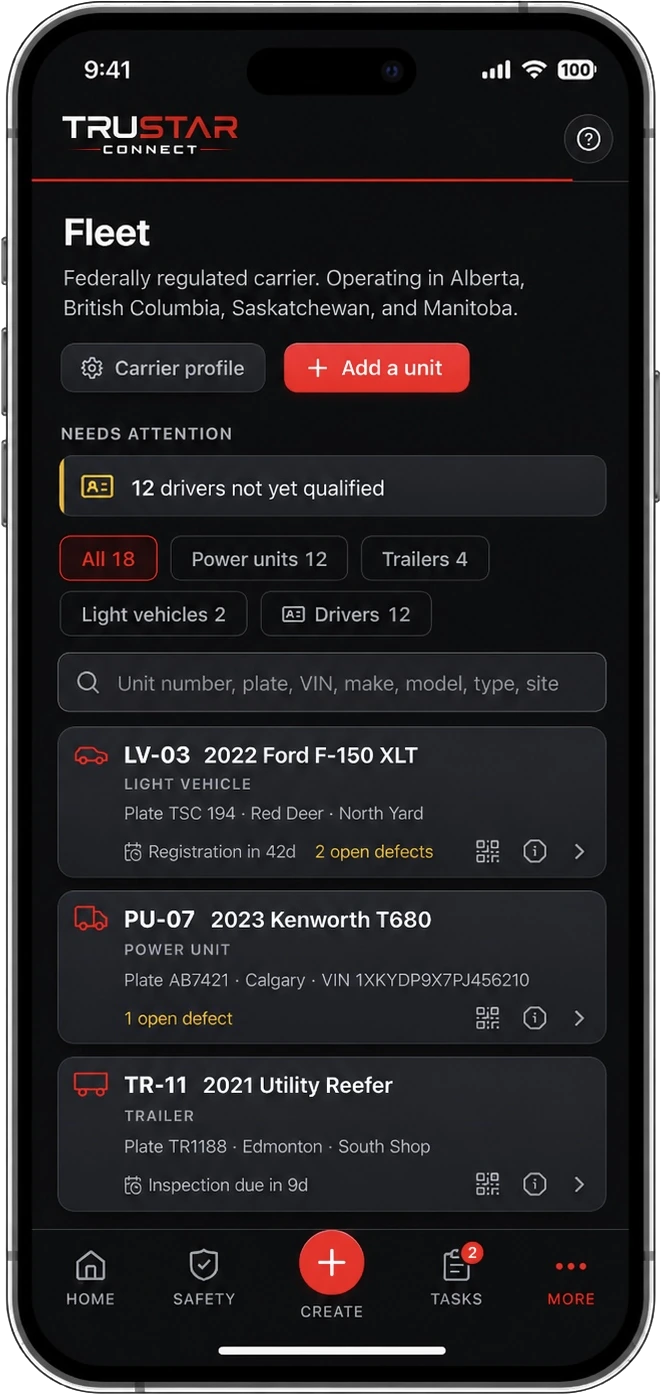
Big fleet or small
One answer changes the whole app.
Whether you cross a border decides which hours of service rules apply to you and whether you need a certified device. You answer it once, at setup, and Fleet holds you to the right set.
Federally regulated
You cross a border.
The federal hours of service regulation applies and a certified electronic logging device is required. Connect the device you already run and TruStar Connect becomes the file around it: driver qualification, trip inspections, the maintenance program, fuel tax and the audit.
- Hours read from your certified device
- Trip inspections to Schedule 1
- IFTA distance and fuel by jurisdiction
- Facility audit scored against your own records
Provincial
You run inside one province.
That province’s hours of service rules apply and the federal ELD mandate does not, so your drivers get an electronic log book in the app instead of a device to buy. Everything else is the same file a federal carrier keeps, because a provincial audit asks most of the same questions.
- Electronic log book, no device to buy
- Driver files, expiries and qualification
- Periodic inspection tracking
- Included in every plan at no extra cost


See it in motion
The screens your safety officer lives in.
The same app in the cab, in the shop and on the desk, online or off. Scroll through what a carrier actually uses.
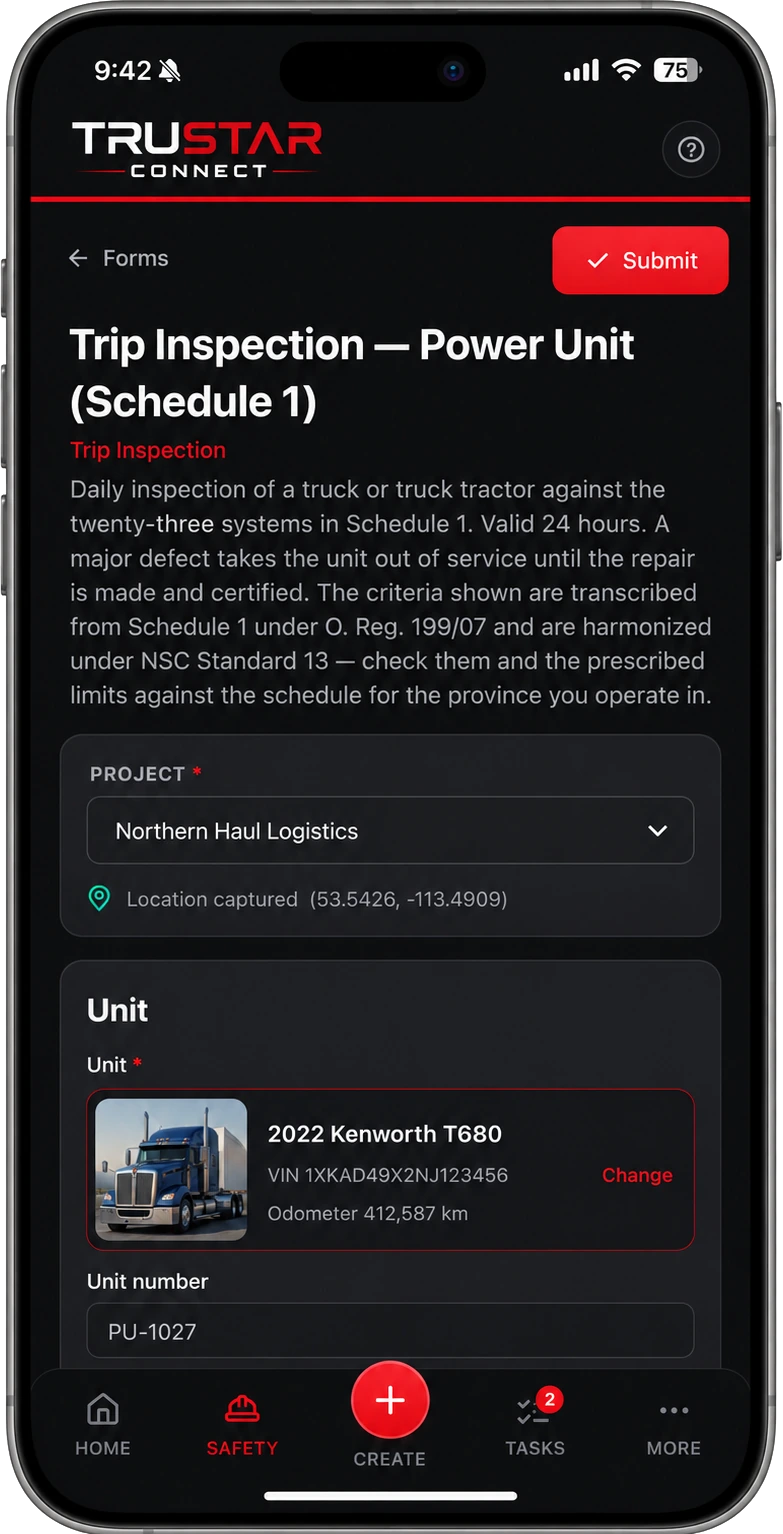
Before the truck goes
The pre-trip, on the phone in their hand.
A daily inspection of a truck or truck tractor against the twenty-three systems in Schedule 1, valid twenty-four hours. Scanning the unit’s QR tag opens the right form on its own — a power unit gets the power unit schedule, a trailer gets the trailer schedule — with the VIN and the odometer already filled in from the telematics device.
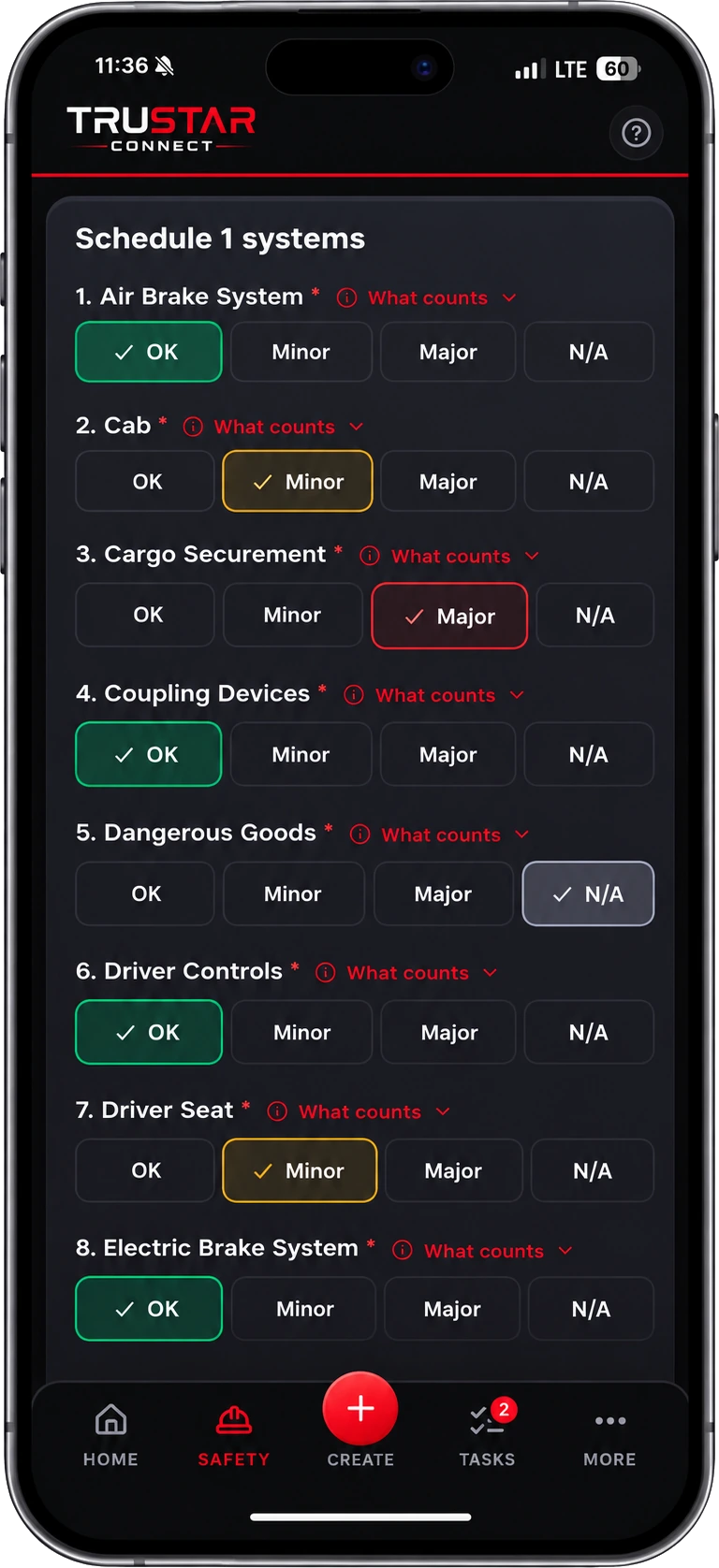
Minor or major
The call that takes a truck off the road.
Every system is OK, a minor defect, a major defect, or not applicable. A minor is repaired before the next inspection and the unit keeps running; a major takes it out of service the moment the inspection is submitted, and it stays there until somebody releases the hold after the repair is certified. Each item carries a What counts link that opens the real criteria, so a driver settles the question at the truck rather than from memory.
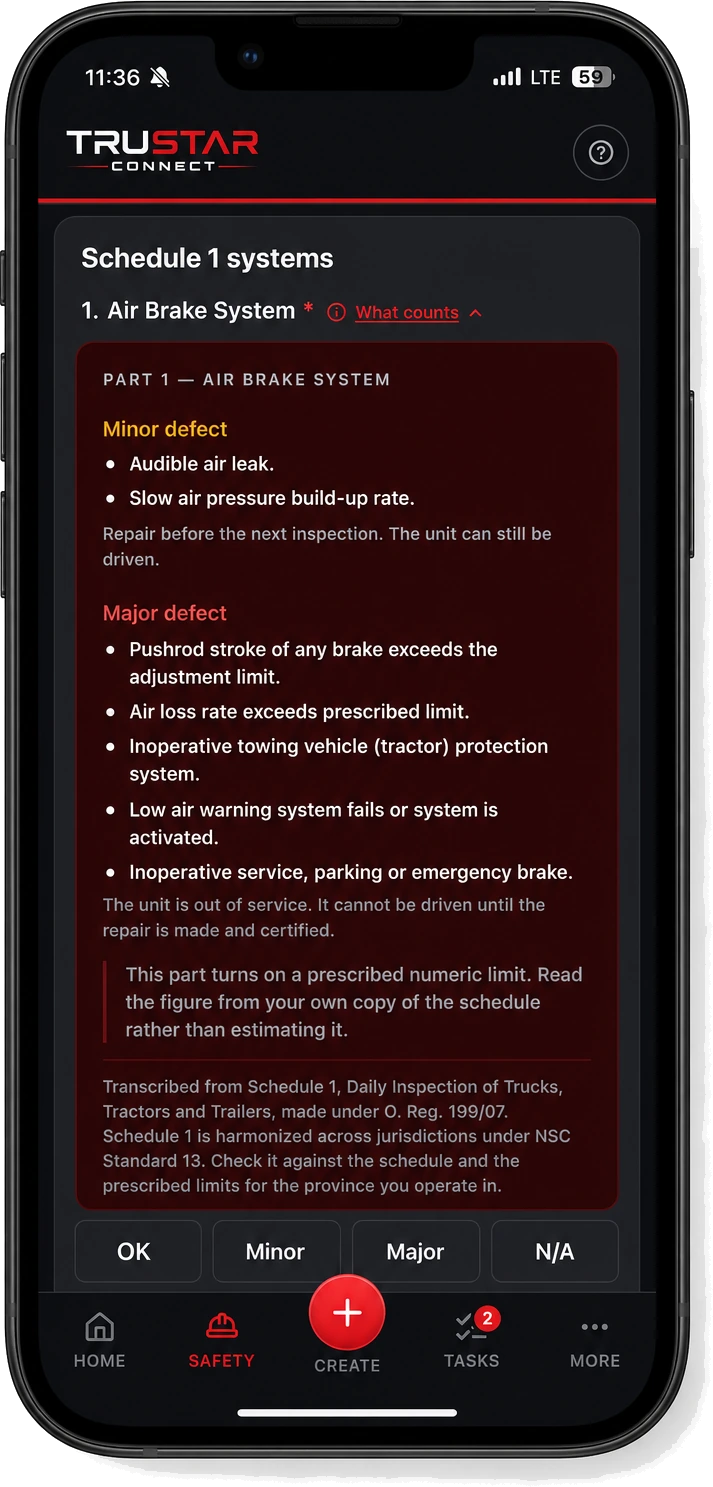
What counts
The criteria, at the truck, in the wording of the schedule.
Audible air leak is minor and the unit still runs. Pushrod stroke past the adjustment limit is major and the unit is done until the repair is certified. That distinction is the whole inspection, and it is the one a driver at 5am is guessing at. Where a part turns on a prescribed figure — pushrod stroke, air loss rate, tread depth, steering lash — the panel says so and sends you to your own copy rather than quoting a number at you.
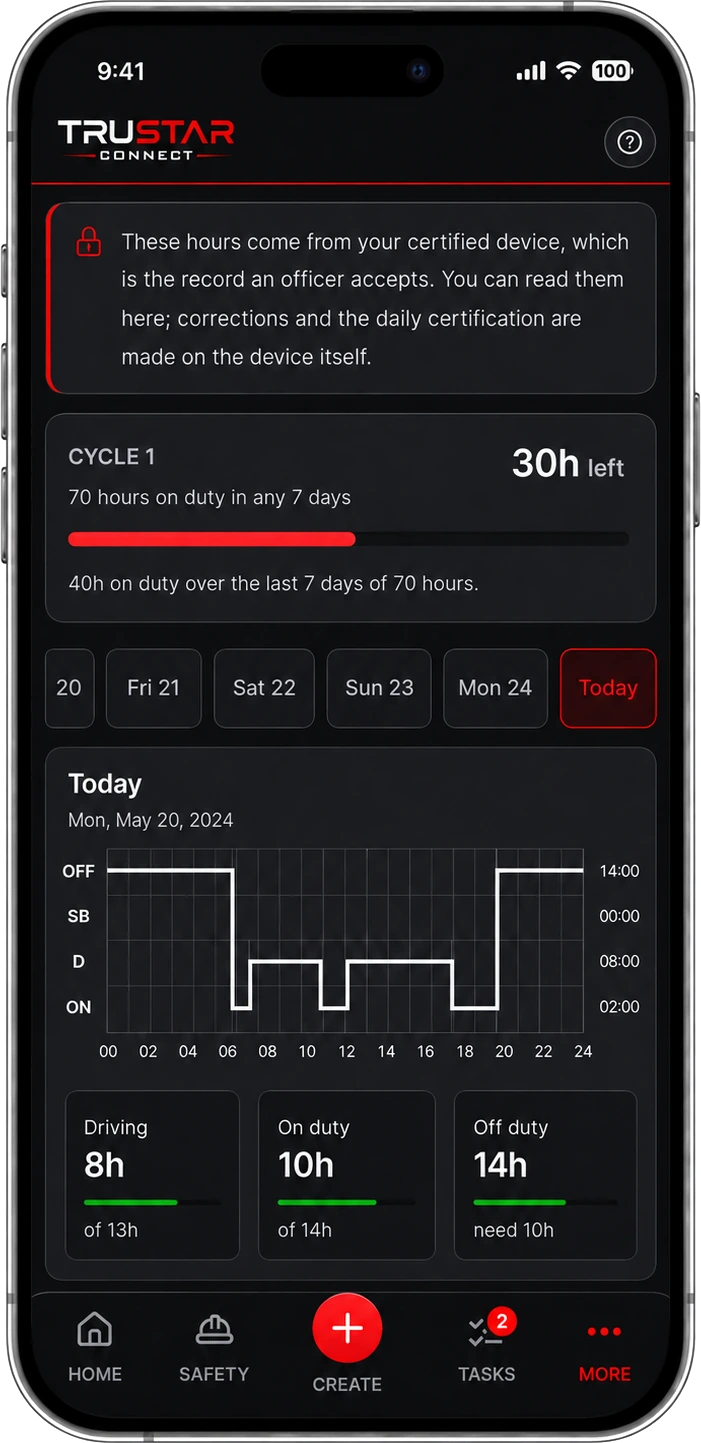
Hours of service
Cycle, day and duty status on one screen.
Provincial carriers keep an electronic log book in the app and sign each day off. Federal carriers run a certified device and the hours arrive from it — and an entry that came from a certified device cannot be edited here by anyone, not a driver, not a manager, not the owner, because the value of a certified record is that it has not been reshaped after the fact.
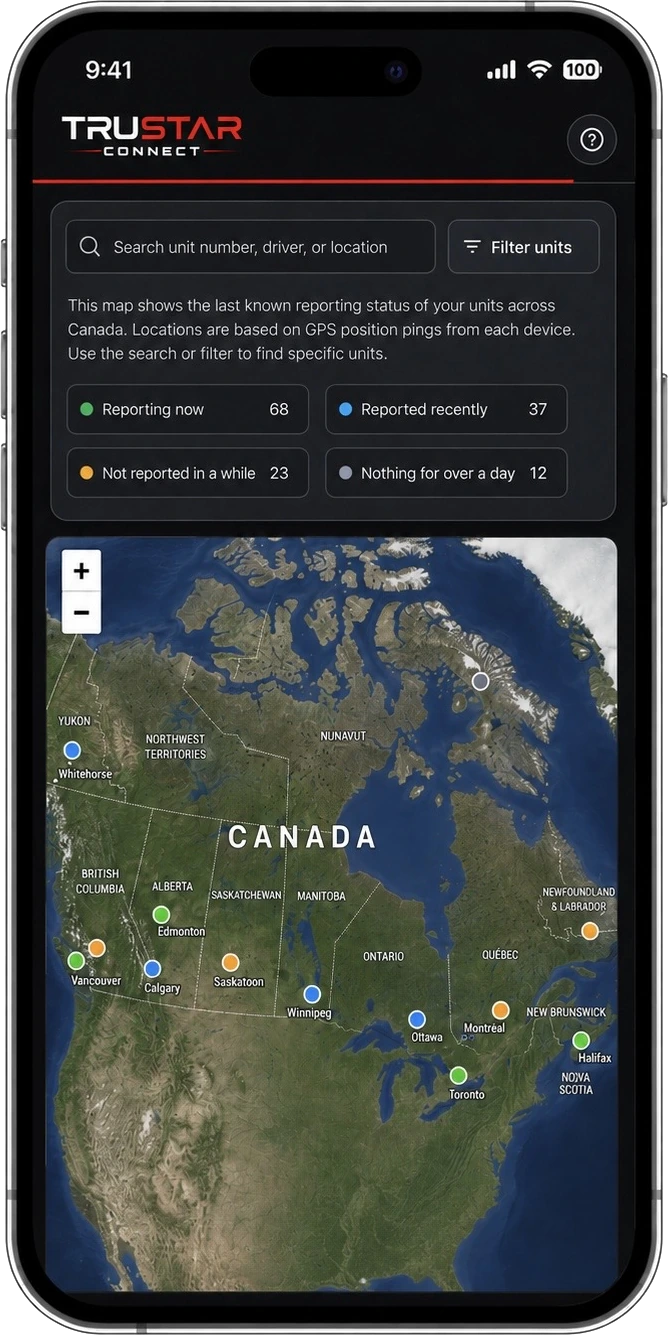
Fleet map
Where every unit last reported from.
Each unit on the map, coloured by how long ago it was last heard from rather than by where it is. That is the number that matters: a unit that has said nothing for a day is a unit whose hours, distance and odometer have all stopped arriving, and it is worth knowing before the quarter closes.
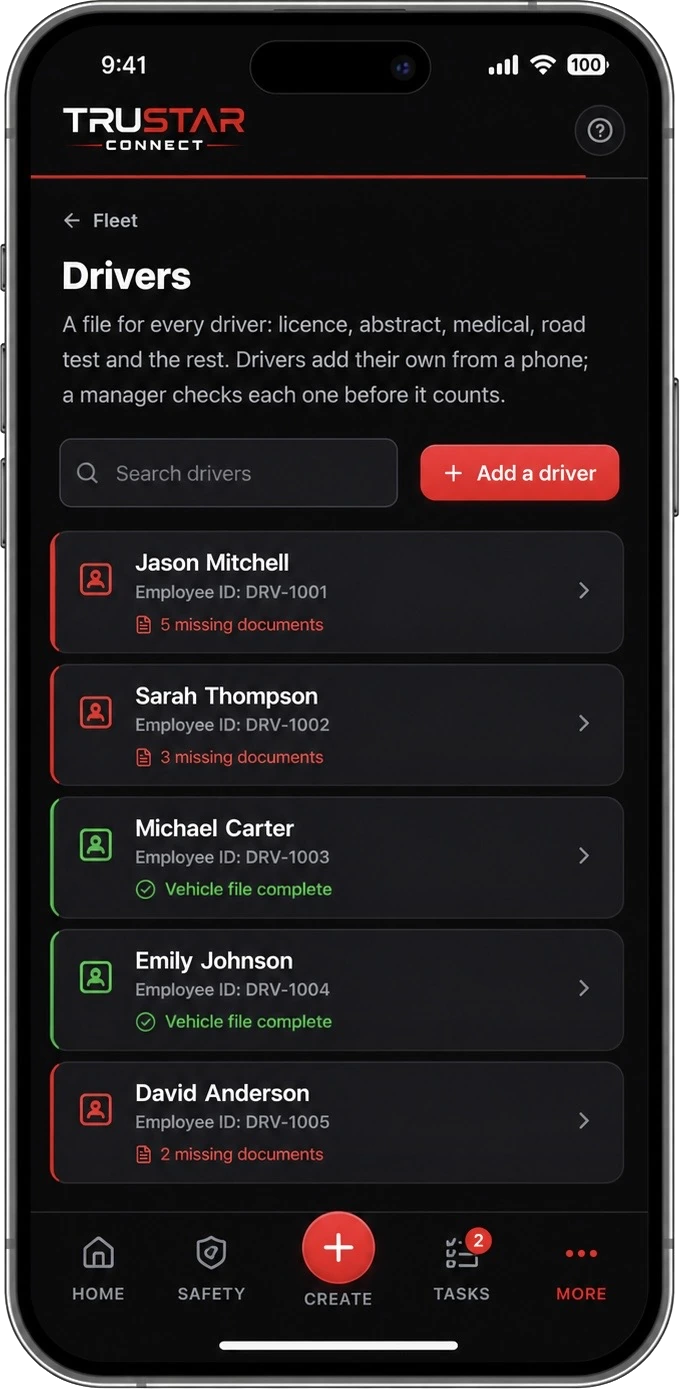
Driver files
The file an auditor pulls, already complete.
Licence with class and endorsements, driver abstract, medical, road test, declaration of prior driving record, and the tickets the job needs. Drivers photograph their own renewals from a phone, which is the only way a file stays current without somebody chasing everyone. The list puts the files that need something done to them first.
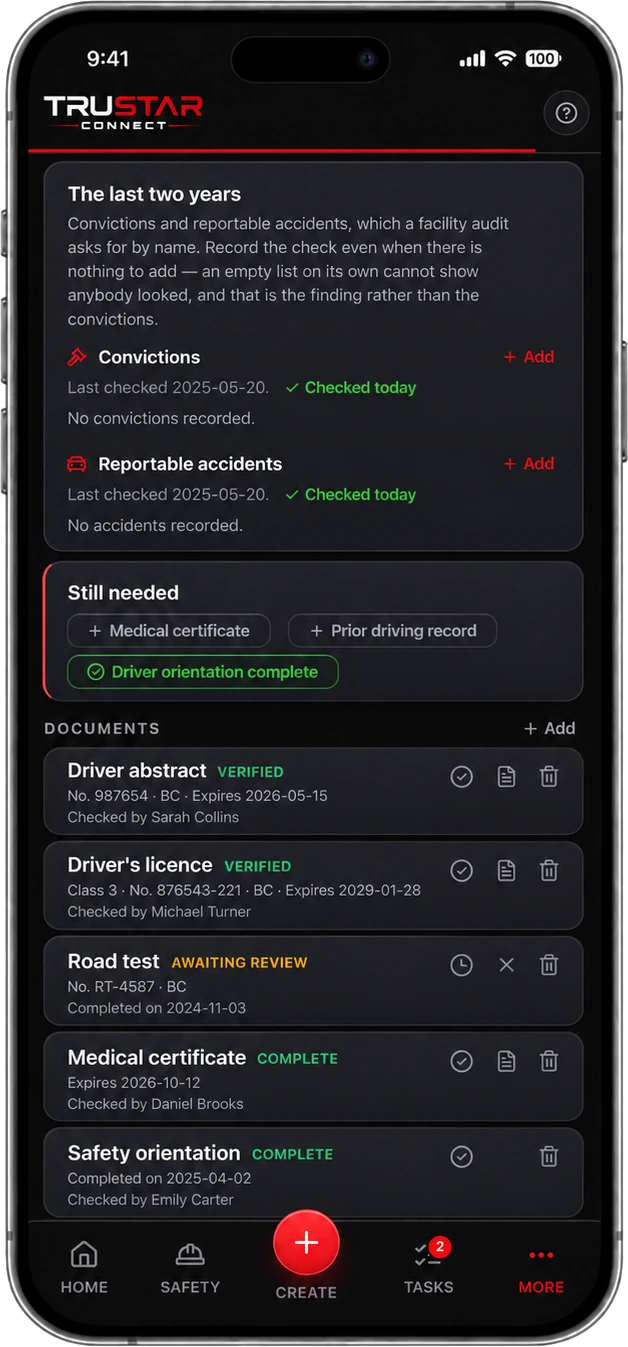
Uploading is not verifying
Someone checked it, and it says who.
Anything added lands as awaiting review, whoever added it, and a manager either verifies it or sends it back with a reason the driver can see. Only a verified, in-date document counts toward a complete file — what an audit asks is not whether a scan exists but who checked it.
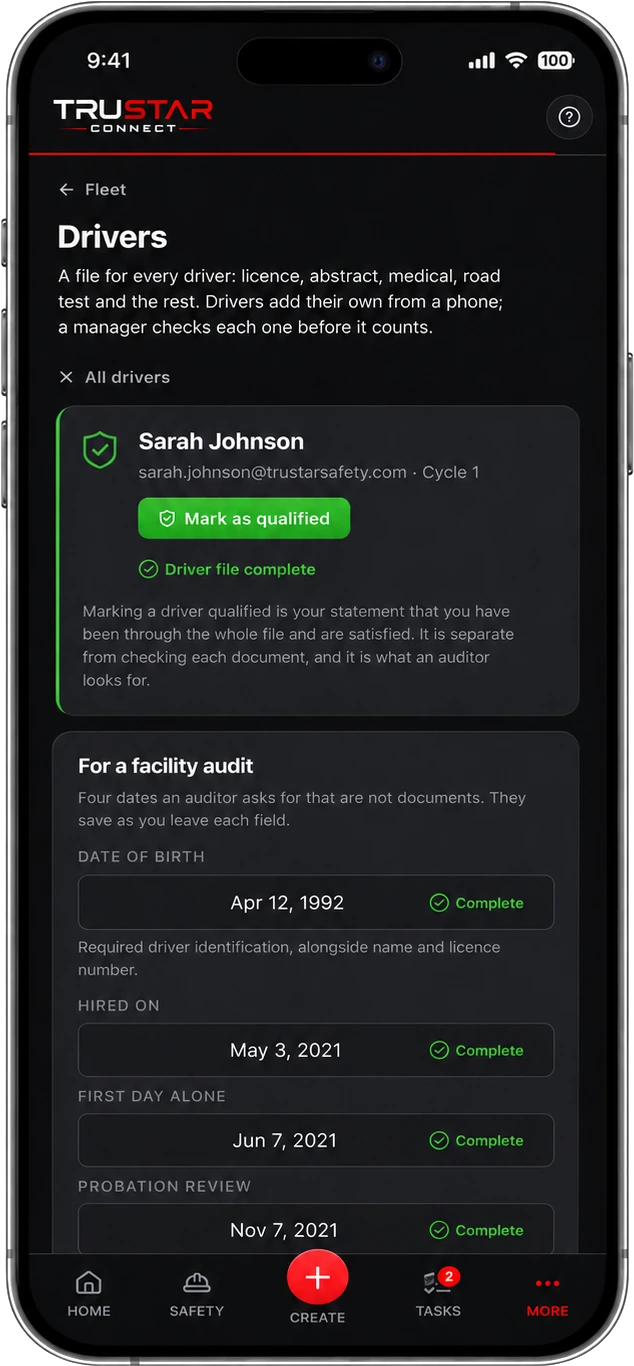
Qualified is your decision
The statement an auditor is looking for.
Marking a driver qualified is separate from checking each document. It is your statement that you have been through the whole file and are satisfied this person is qualified to drive for you. Beneath it sit the two-year checks a facility audit asks for by name — convictions and reportable accidents — which you record even when there is nothing to add, because an empty list on its own cannot show that anybody looked.
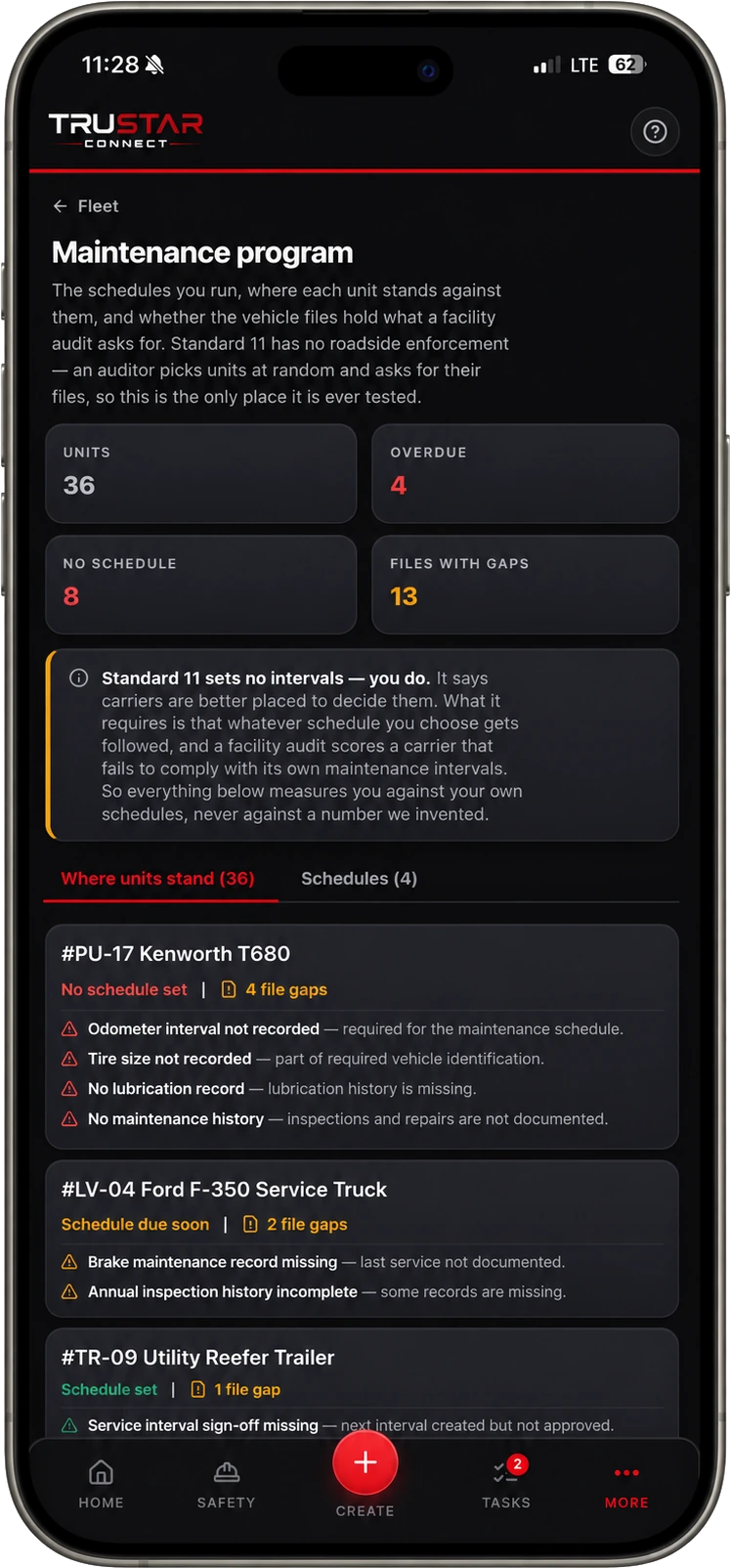
The maintenance program
Measured against your schedule, not ours.
Standard 11 sets no intervals — it says carriers are better placed to choose them, and requires that you keep to whatever you choose. So declare your own schedules and every unit is scored against those. It also reads each vehicle file for what is missing: no odometer interval, no lubrication record, no tire size, no maintenance history. Standard 11 has no roadside enforcement at all, so a facility audit is the only place those gaps are ever found.
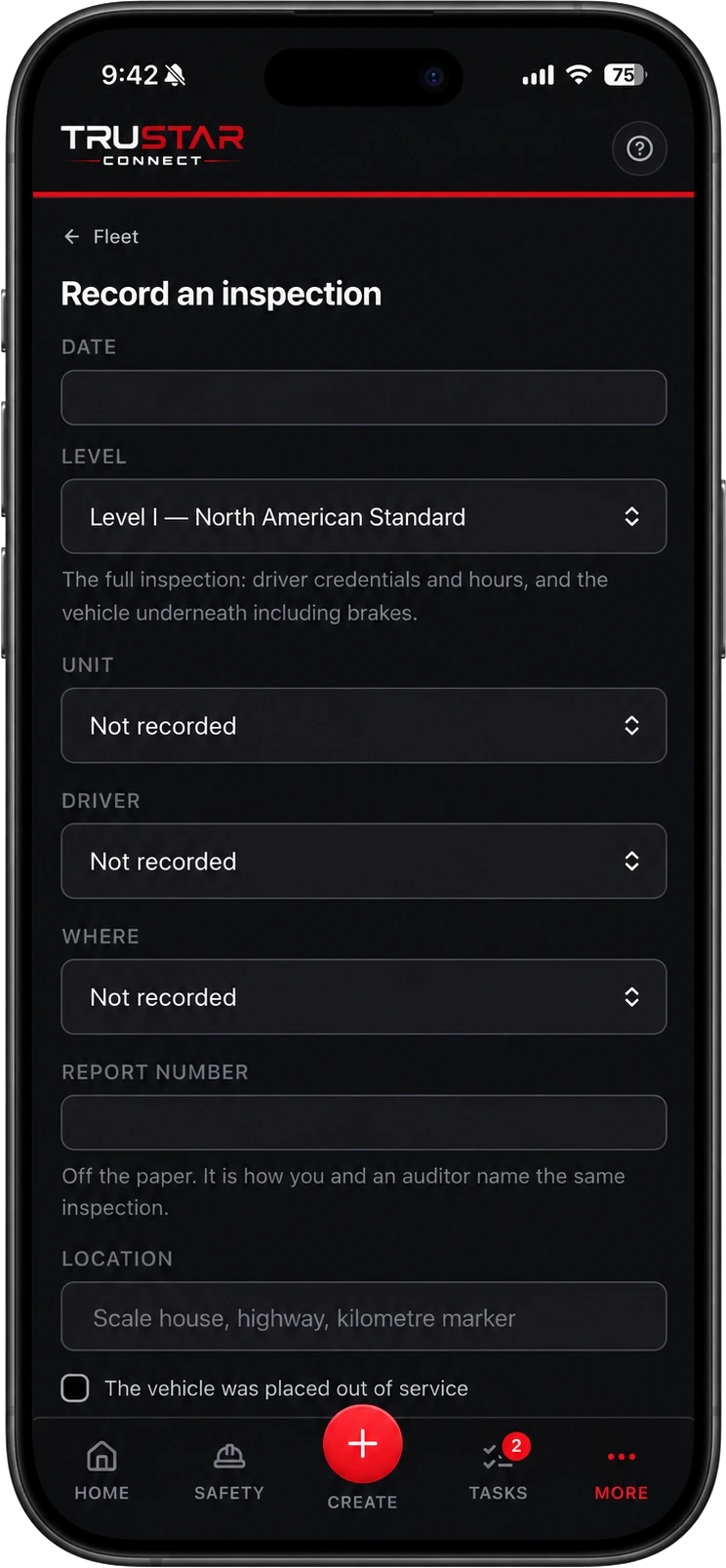
Roadside and collisions
The scale house report, filed where it counts.
Record every CVSA report you receive, by level, with the report number off the paper so you and an auditor are naming the same inspection. Out-of-service outcomes carry straight through into your audit result. A clean inspection is worth recording too — it is the half of your record that only exists if somebody enters it.
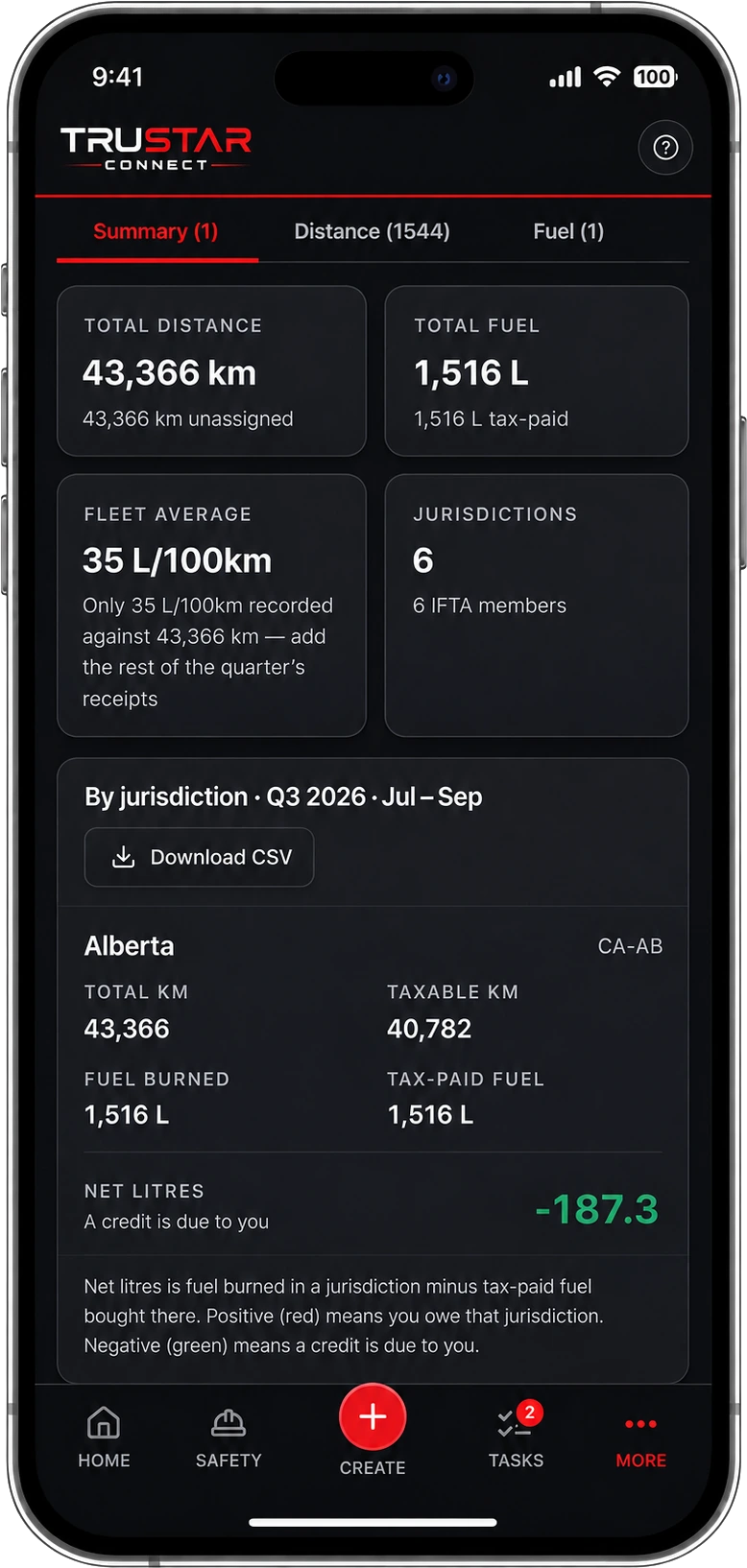
Fuel and IFTA
The worksheet your return is filled in from.
Distance by jurisdiction pulled from the device that watched every border crossing as it happened, tax-paid fuel read off a photographed receipt or a whole card statement at once, and net litres owed or credited per jurisdiction. It does not calculate tax owing and does not file for you — rates change every quarter, and a stale rate on a tax document is worse than no rate at all.
Telematics
Your trucks already report. We read what they send.
Works with

Connect Geotab or Samsara once and the vehicles and drivers in it are matched to your own records — by VIN first, then serial, plate and unit number. Anything ambiguous is left alone rather than guessed at, because filing one driver’s hours against another driver’s name is worse than filing none.
If your telematics system knows about trucks you have never entered here — normal on the first connection — tick them and create them in one step, VIN, plate and unit number already filled in.
It only ever reads.
Nothing is written back to your fleet system. Create credentials just for this — a read-only user in Geotab, or an API token in Samsara with read access only — rather than using a person’s own login. Either can then be revoked on its own without changing anybody’s password, and neither can alter anything in your fleet system. What you enter is encrypted before it is stored and is never shown again, to you or to us.
Geotab and the Geotab logo are trademarks of Geotab Inc. Samsara and the Samsara logo are trademarks of Samsara Inc. Both are used here to identify the telematics platforms TruStar Connect reads from.
National Safety Code
Built around the standards, not around a checklist.
Compliance is something your carrier holds and no software can hand you. What this does is keep the records the standards require, in the form an auditor asks for them, and tell you where you stand before somebody else does.
Standard 7
Carrier and driver profiles
Your carrier profile, the safety fitness certificate and its expiry date, and the provinces you operate in.
Standard 9
Hours of service
Cycle 1 and Cycle 2, the daily and cycle limits, and the off-duty a driver owes before the next shift.
Standard 10
Cargo securement
Load security checked as part of the trip inspection, before the unit moves. Securement convictions also land on your carrier profile.
Standard 11
Maintenance and PMVI
The standard sets no intervals — it says carriers are better placed to choose them, and requires that you keep to whatever you choose. So every unit is measured against your own declared schedule, never a number we invented.
Standard 12
CVSA on-road inspections
Record the reports you receive, with out-of-service outcomes carried through into your audit result.
Standard 13
Trip inspections
Two forms built on the Schedule 1 systems — one for power units, one for trailers — with the minor and major defect criteria readable at the truck.
Standard 15
Facility audit
The audit itself: the sample an auditor draws, the records they pull, and what they score. Appendix A is also what defines a complete driver file, item by item.
Standard 16
Entry-level training
Mandatory entry-level training tracked in the driver file alongside the licence, abstract and medical.
Ontario
CVOR
Not an NSC standard, but the number that decides whether an Ontario carrier keeps operating. Abstracts kept as a history, the events behind them, and what sits inside the 24-month window today.
Run the facility audit on yourself.
Audit Readiness works out the sample an auditor would draw from a fleet your size, names the drivers and the units it would pull, and scores each file the way the standard scores it. You find the three drivers with no abstract on file in the office, in an afternoon, rather than in a boardroom with somebody taking notes.
The rest of the platform
A trucking company is not only its trucks.
Fleet is one section of TruStar Connect, and the rest comes with it. Your shop, your yard and your drivers are covered by the same safety program, in the same app, at the same flat price.
Investigations
A rollover, a backing incident, a cargo shift. A guided investigation walks from evidence to root cause, and AI reads your scene photos and the procedures that govern the work to surface the gap between what is written and what happened.
Observations
Drivers and yard staff log a hazard or a near miss from a phone, or anonymously from a QR poster in the shop. The ones that matter become corrective actions with an owner and a due date.
Documents and SDS
Safety data sheets, policies, procedures and JHAs in one controlled library, with sign-off tracked per person. Saved to the device, so a driver can open an SDS at a customer gate with no signal.
Inspections and forms
Beyond the trip inspection: yard checks, shop inspections, load securement audits. Build one by hand, photograph a paper form and let AI rebuild it, or describe what you need.
COR and SECOR
A live readiness score against the audit standard, element by element. Many carriers need both a facility audit and a COR audit; you are keeping one set of records for both.
Offline in the field
Pre-trips, observations and corrective actions all complete with no connection and upload themselves when signal returns. Nothing is re-keyed at the end of a run.
One corrective action list covers the lot. A defect found on a pre-trip, a near miss reported in the yard and a finding from an investigation all land in the same place, with an owner, a due date and somebody who verifies the fix actually held.
Pricing, in the open
Priced by people, not by truck.
Every plan includes the entire platform, Fleet included. Add a truck and your price does not move.
Starter
Up to 10 workers
or $158/mo billed yearly
For small crews getting COR ready.
Growth
11 to 50 workers
or $428/mo billed yearly
For growing teams working across sites.
Pro
51 to 150 workers
or $989/mo billed yearly
For established multi crew operations.
Enterprise
150+ workers
Tailored pricing for large operations.
Straight answers
What carriers ask us first
Is TruStar Connect a certified electronic logging device?
No, and we will not tell you otherwise. If you are a federally regulated carrier you need a certified ELD, and TruStar Connect reads the hours from it rather than replacing it. If you are a provincial carrier the federal mandate does not apply to you, and the electronic log book in the app is what your drivers use instead.
Does this make my company NSC compliant?
Compliance is something a carrier holds, not something software can grant. What TruStar Connect does is keep the records the National Safety Code standards require, in the form an auditor asks for them, and show you where the gaps are before somebody else finds them. The facility audit screen scores your own files against Standard 15 and tells you which drivers and which units would fail today.
We run five trucks. Is this too much software for us?
No. A five-truck provincial carrier faces most of the same questions a hundred-truck federal one does, with nobody in the office to answer them. Fleet is included in every plan at no extra cost, and it stays hidden until you turn it on, so you are not paying for a module and not looking at screens you do not use.
What does the telematics integration actually do?
It reads. Geotab and Samsara are both supported and you connect whichever one you are on. Vehicles and drivers are matched to your own records, then hours of service, odometer readings, last known position and IFTA distance by jurisdiction come across on demand. Nothing is written back. Use a read-only Geotab user or a read-only Samsara API token created for this and you can revoke it on its own without changing anybody’s password.
Can it handle our fuel tax?
It builds the worksheet your quarterly return is filled in from: distance by jurisdiction, tax-paid fuel bought in each one, and net litres owed or credited. It does not calculate tax owing and does not file for you, because rates are published per jurisdiction, per fuel type, per quarter, and a stale rate on a tax document is worse than no rate at all.
What about CVOR?
Ontario carriers get a CVOR screen: your abstracts kept as a history, the collisions, convictions and inspections behind them, and exactly what is inside the 24-month rate window with the date each event leaves it. What it will not do is calculate your violation rate — the point values and threshold tables are the Ministry’s, and a rate worked out from a second-hand copy of them would look exactly like the real one. You enter the figures off your own abstract and the screen shows you those. It does not pull the abstract from the Ministry for you either.
How long does it take to set up?
Turn Fleet on and answer whether you are federal or provincial — that one answer decides which rules the app holds you to. If your trucks are on Geotab or Samsara, the first sync imports the vehicles and drivers it can see, so a fleet being set up for the first time gets its register populated in one step rather than typed in.
Where is our data held?
In Canada, in the ca-central-1 region. Driver medicals, abstracts and hours are personal information about your employees, and it does not leave the country.
Put your own fleet in it for two weeks.
Full access to the whole platform for 14 days. No credit card, no demo, no sales call. Connect Geotab or Samsara, import your trucks and your drivers, and run the facility audit on what you already have.
- Fleet included in every plan, at no extra cost
- Import your vehicles and drivers from Geotab or Samsara in one step
- Run the Standard 15 facility audit on your own files
- Your data hosted in Canada (ca-central-1)
- Works fully offline in the cab and in the shop
We will tell you what this does not do — we are not a certified ELD, we do not file your fuel tax, and we do not calculate your CVOR violation rate. Everything on this page, we built.
Start your 14-day free trial
Full access. No credit card. Set up in minutes.
By starting a trial you agree to our Terms of Service. We will never sell your data.